Developers choose Next.js for its speed, scalability, and seamless developer experience. Marketing teams approve the migration because they are promised a massive boost in search engine rankings.
The reality is that Next.js is not an automatic silver bullet for organic growth. Out of the box, it provides the tools to build an SEO-friendly website, but you still have to assemble those tools correctly. If your configuration is flawed, you can easily deploy a blazing-fast website that Google completely ignores.
Below are the foundational Next.js SEO best practices we implement at Traficxo to ensure our clients' web architecture actually drives commercial pipeline.
1. Master Your Rendering Strategies (SSR vs. SSG)
The primary reason JavaScript-heavy websites fail at SEO is Client-Side Rendering (CSR). When a site relies entirely on CSR, Googlebot receives a blank HTML document and a bundle of JavaScript. The crawler then has to expend significant resources to render the page before it can understand the content. Often, it just gives up.
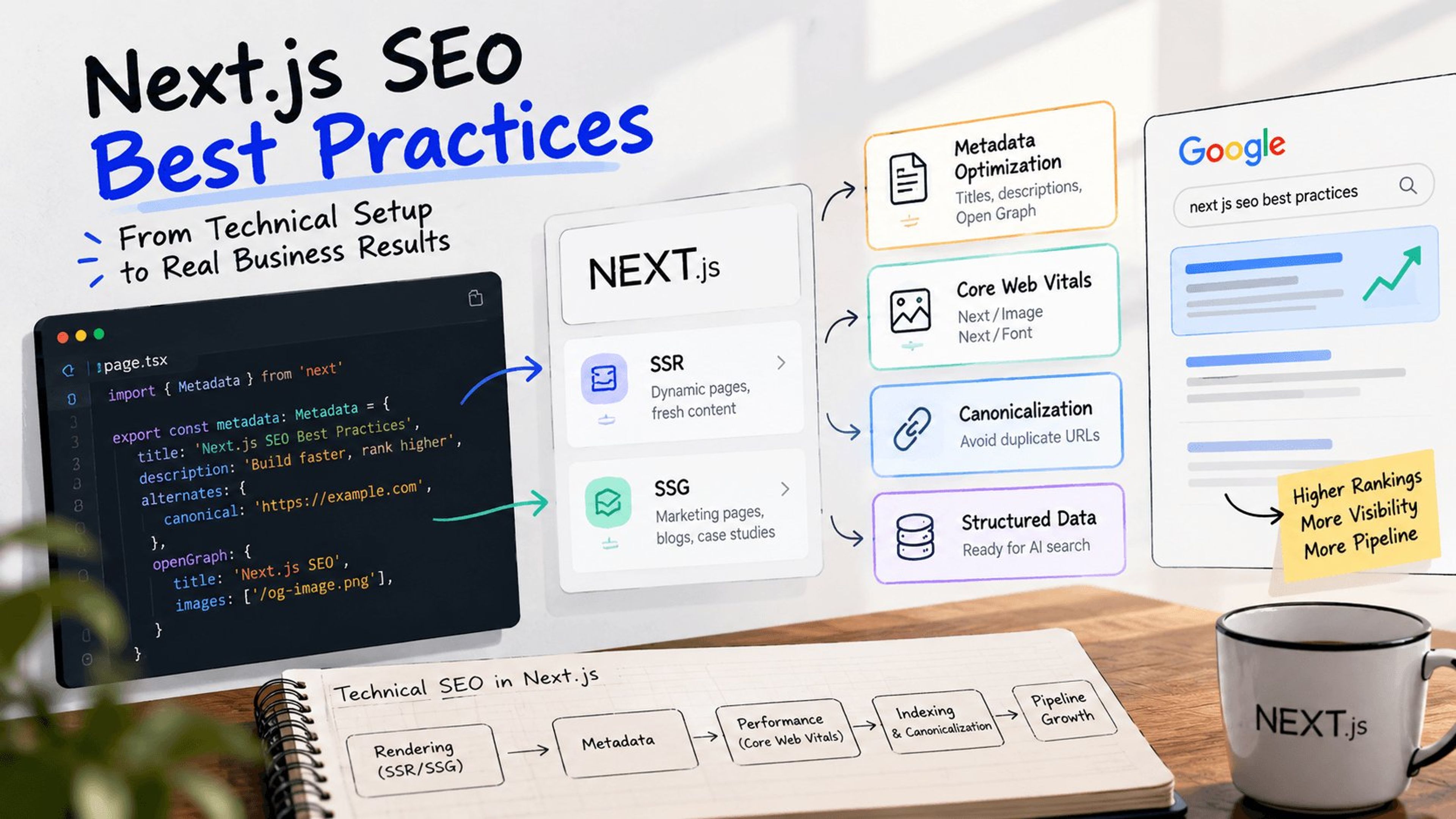
Next.js solves this by offering Server-Side Rendering (SSR) and Static Site Generation (SSG). You need to apply the right strategy to the right pages.
- Static Site Generation (SSG): This is ideal for your marketing pages, blog posts, and case studies. The HTML is generated at build time and served instantly via a CDN. This provides the fastest possible Time to First Byte (TTFB) and is heavily rewarded by search engines.
- Server-Side Rendering (SSR): Use this for dynamic pages that change constantly, such as real-time pricing pages, gated B2B dashboards, or inventory-dependent service listings. The server generates the HTML on each request, ensuring Google always indexes the freshest data.
Want to see this in action? Learn how our Next.js web development team structures high-converting marketing sites.
2. Optimize Metadata Dynamically with the App Router
If you are using the modern Next.js App Router, managing your title tags and meta descriptions has become much more streamlined. You no longer need to rely on third-party packages like next-seo.
Instead, utilize the built-in Metadata API. You can export a static metadata object in your layout.tsx or page.tsx files for standard pages. For programmatic pages like dynamic service locations or individual blog posts, use the generateMetadata function to pull specific titles, descriptions, and Open Graph tags directly from your CMS.
A critical best practice here is setting a base URL (metadataBase) in your root layout. This ensures all your canonical tags and social images resolve to absolute URLs, preventing duplicate content issues across different environments.
3. Bulletproof Your Core Web Vitals
Google uses Core Web Vitals as a direct ranking factor. Next.js provides built-in components that automate the most difficult parts of performance optimization.
- Next/Image: Never use standard HTML <img> tags. The <Image /> component automatically lazy-loads your visuals, prevents Cumulative Layout Shift (CLS) by reserving space, and serves modern formats like WebP or AVIF based on the user's browser. This single component will drastically improve your Largest Contentful Paint (LCP) score.
- Next/Font: Custom fonts often cause layout shifts and delay text rendering. The next/font module automatically optimizes your fonts and removes external network requests for Google Fonts, ensuring your typography loads instantly without layout jank.
4. Control Index Bloat with Strict Canonicalization
Next.js makes it incredibly easy to spin up dynamic routes. The downside is that you can accidentally generate thousands of duplicate URLs through sorting parameters, tracking tags, or faceted search filters.
If Google wastes its crawl budget on these duplicate variations, your high-priority commercial pages will struggle to rank.
You must enforce strict canonical tags on every page. The canonical tag tells search engines which version of a URL is the master copy. Combine this with a properly configured robots.txt file and a dynamic sitemap.ts file that automatically updates whenever a new high-value page is published.
Need help cleaning up your crawl budget? Explore our Technical SEO services for enterprise B2B brands.
5. Implement Structured Data for AI Search (GEO)
Traditional SEO is evolving. B2B buyers are increasingly turning to AI answer engines like Perplexity and Google AI Overviews to find software and agency partners. To capture this traffic, you need to practice Generative Engine Optimization.
AI models rely heavily on structured data to parse facts about your business. You must inject clean JSON-LD schema directly into your Next.js components.
Do not just use basic website schema. Implement specific Organization, FAQPage, and Product schemas. In Next.js, you can easily inject this JSON-LD into your pages using a simple <script type="application/ld+json"> tag within your page layouts. The clearer your entity relationships are, the more likely AI engines are to cite your brand as an authority.
Stop Guessing with Your Web Architecture
You can write the best B2B content in your industry, but if your Next.js architecture is fighting against search engine crawlers, you will never see the pipeline growth you expect.
Technical SEO requires precise execution. If your Core Web Vitals are failing, your pages are trapped in client-side rendering, or your technical foundation is leaking crawl budget, it is time for a professional review.
We engineer B2B websites that rank, load instantly, and convert.
Ready to turn your Next.js site into a growth asset? Book a Web Dev Consultation with our team today and let us map out exactly what is holding your domain back.
Explore Services & Solutions
SEO Services Hub
Access our comprehensive vertical strategies, core processes, and expert resources.
View service hub Specialized SolutionEnterprise Technical SEO
Drive high-intent organic traffic with our advanced technical auditing and optimization frameworks.
Learn moreReady to grow your digital presence?
Connect with our execution specialists for a customized roadmap.