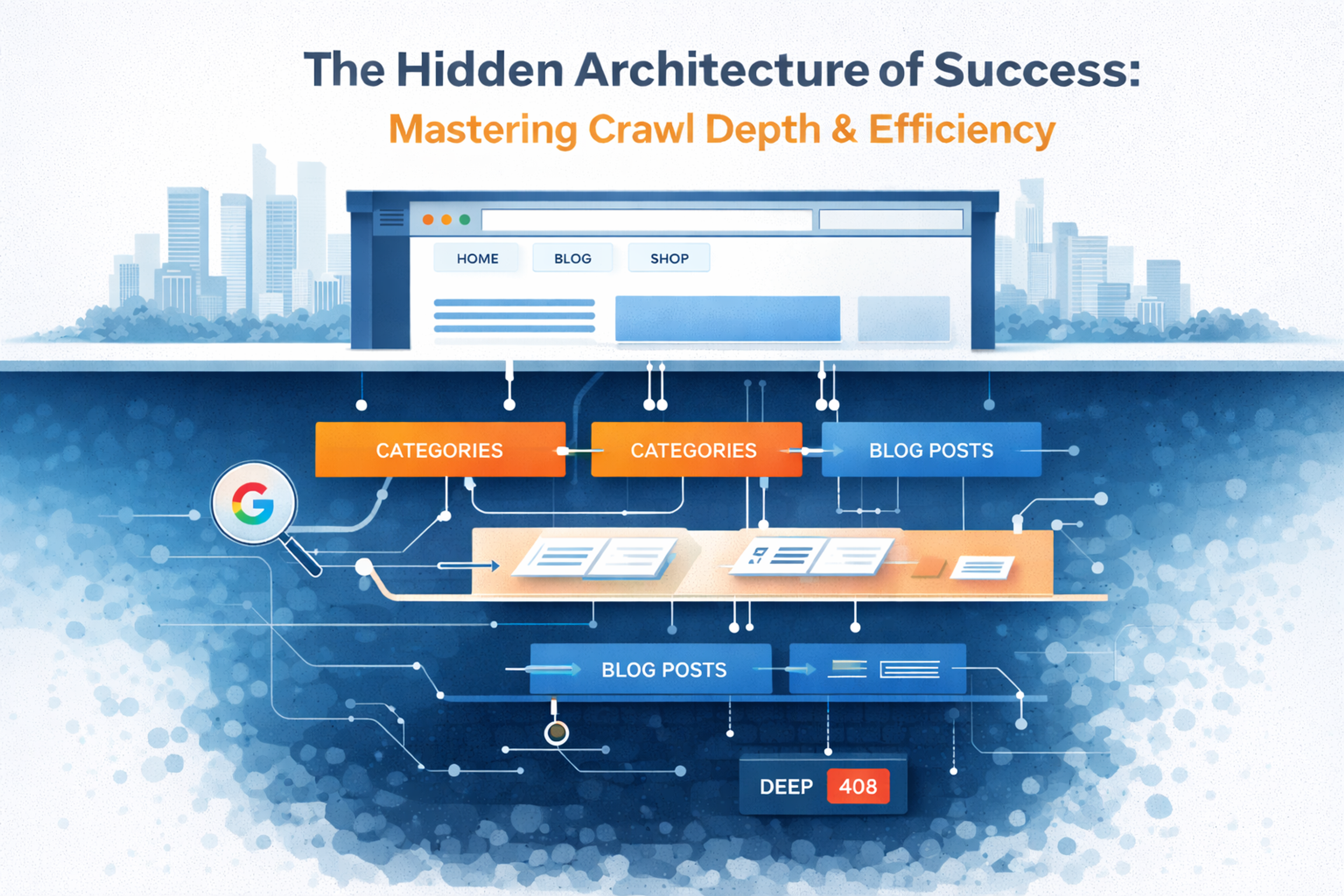
When we talk about SEO, we often get bogged down in the "surface" metrics: keyword density, backlink counts, or whether our meta descriptions are punchy enough. But beneath the polished veneer of your homepage lies a complex, subterranean world where Google’s bots live. This is the world of Crawl Depth and Crawl Efficiency.
If your website were a library, crawl depth would be the number of floors you have to descend to find a specific book. If that book is buried in a sub-basement five levels down, there’s a good chance the librarian (Googlebot) will get tired and turn back before ever seeing it.
In this guide, we’re going to pull back the curtain on how search engines actually navigate your site and, more importantly, how you can build a "fast-track" system to ensure your most important content is always discovered.
Defining the Core: What is Crawl Depth?
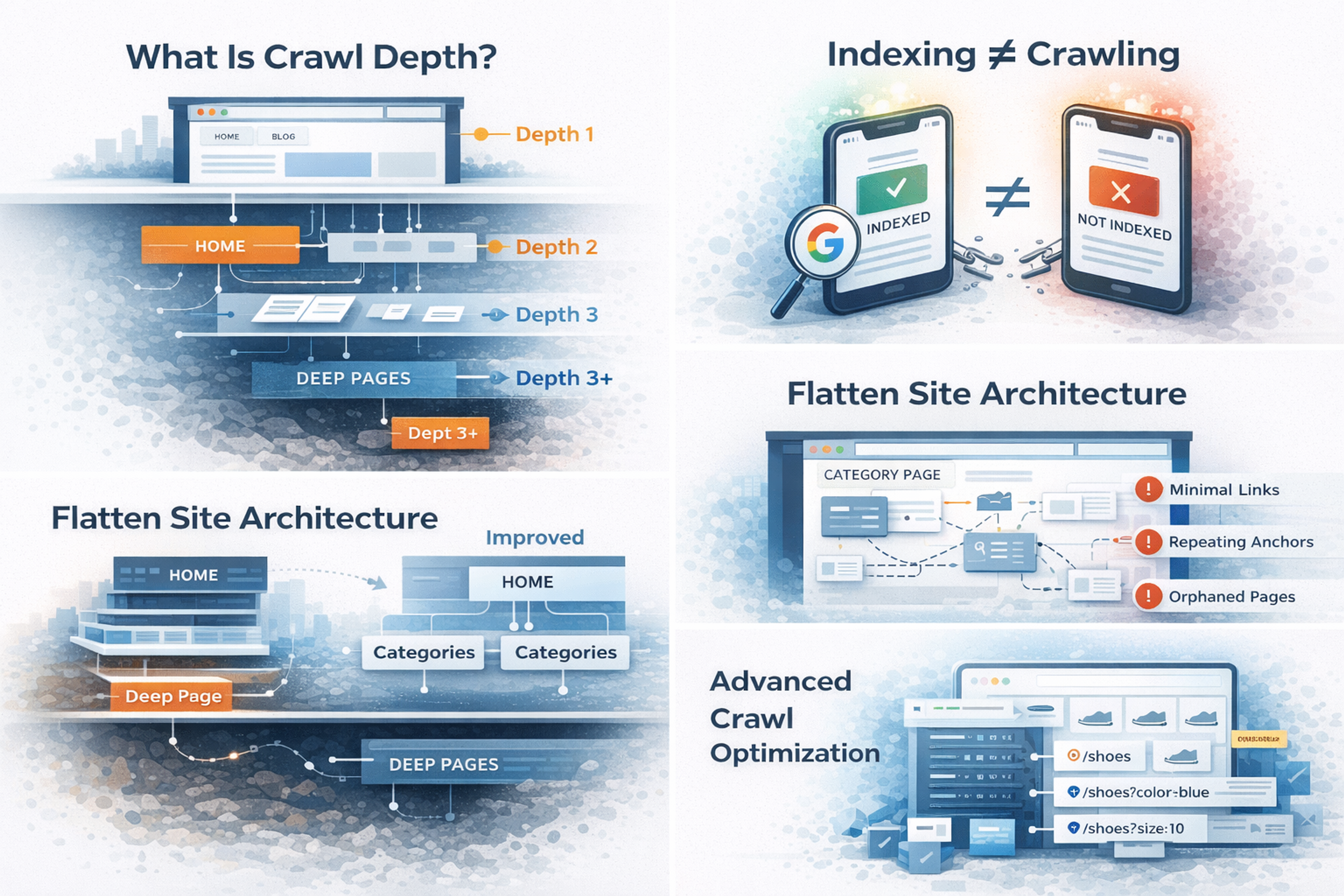
In technical SEO, Crawl Depth refers to the number of clicks it takes to reach a specific page from the homepage (the root domain).
- Depth 1: Your Homepage.
- Depth 2: Pages linked directly from the homepage (e.g., your "Services" or "Blog" category).
- Depth 3: Pages linked from those sub-pages (e.g., a specific blog post).
- Depth 10+: The "Deep Web" of your own site—pages so buried they rarely see the light of day.
Why Crawl Depth Matters?
Search engines are efficient, but they aren't infinite. They operate on a Crawl Budget—a set amount of time and resources Google allocates to your site. If your site structure is a labyrinth, Googlebot will waste its budget navigating hallways instead of reading the books.
The Golden Rule: Your most important, money-making pages should never be more than 3 clicks away from the homepage. If a user can’t find it quickly, a bot likely won't prioritize it either.
Understanding Crawl Efficiency: The "Fuel" of SEO
Crawl Depth is the map; Crawl Efficiency is how fast the car travels. Crawl Efficiency is the measure of how effectively a search engine can discover, process, and index your pages without hitting dead ends or getting stuck in "infinite loops."
A site with high crawl efficiency gets updated in search results faster. A site with low efficiency might wait weeks for Google to realize a price has changed or a new product has been launched. Think of efficiency as the "health" of your site's relationship with search bots. If you make their job easy, they reward you with better visibility.
Factors that Kill Efficiency:
- Duplicate Content: Forcing a bot to crawl the same content under five different URLs (e.g., tracking parameters or session IDs).
- Slow Server Response: If your page takes 5 seconds to load, the bot might only visit 10 pages instead of 100 in its daily "visit."
- Soft 404s: Pages that look broken but tell the bot "everything is fine" (returning a 200 OK status code).
- Redirect Chains: Making the bot jump through three or four hoops just to get to one destination.
The Architecture of a Shallow Site
To increase efficiency, we need to "flatten" the site. Think of your site structure like a tree. A "tall" tree is hard to climb; a "wide" tree is much easier to navigate.
In a flat architecture, you reduce the distance between the "root" (the homepage) and the "leaves" (the individual content pages). This doesn't mean you should have 10,000 links on your homepage—that would be a nightmare for users. Instead, it means creating logical, well-organized categories that keep the path short.
The Power of Internal Linking
Internal links are the "elevators" of your website. They allow bots to skip levels. Instead of relying on a linear path (Home > Category > Sub-Category > Product), you can use:
- Related Posts/Products: Link from one Depth 3 page to another Depth 3 page.
- Featured Sidebars: Link from the homepage directly to a high-value blog post (bringing it from Depth 4 to Depth 2).
- Breadcrumbs: These provide a clear path back up the chain, helping bots understand the relationship between pages and providing additional paths for crawling.
The Concept of the "Crawl Budget"
You might be wondering: "Why can't Google just crawl everything?" The answer is simple economics. Every time Googlebot visits your site, it consumes electricity, server power, and time. Multiply that by the billions of websites on the internet, and you see the problem.
Google allocates a specific "budget" to your site based on its Authority and its Frequency of Updates. If you have a massive site but low authority, Google won't waste its time crawling every corner every day. If you have high authority, Google might visit thousands of times an hour.
By improving crawl efficiency, you are effectively "stretching" your budget. You’re telling Google: "Don't look at these 500 junk pages; spend all your time on these 50 important ones."
Technical Lever #1: Managing Your Robots.txt
Your robots.txt file is the "Bouncer" of your website. It tells Googlebot where it’s allowed to go and, more importantly, where it’s prohibited from going.
If you have 10,000 pages but only 2,000 are actually valuable for search (the rest being admin pages, filter results, or customer login areas), you are wasting 80% of your crawl budget.
Actionable Tip: Use Disallow for:
- Internal search result pages (e.g., /search?q=...)
- URL parameters that don't change content (tracking IDs, session tokens).
- Private staging environments or "Thank You" pages that don't need to be in search results.
- Login and registration pages.
Technical Lever #2: Sitemaps and the "Last Modified" Tag
An XML Sitemap is a literal list of URLs you want Google to crawl. However, many SEOs set them and forget them. To boost efficiency, you need to use the <lastmod> tag correctly.
By telling Google exactly when a page was last updated, you prevent the bot from re-crawling static pages that haven't changed in years. It can then focus its energy on the new content you just published. This is particularly crucial for large news sites or e-commerce stores where inventory changes daily.
The "Silent Killer": Redirect Chains and Loops
Every time a bot hits a 301 redirect, it has to stop, process the new URL, and start a new request. If you have a chain (A -> B -> C), you are effectively tripling the work for the bot. If that chain gets long enough (usually 5+ hops), the bot will often give up entirely, and the final page will never get indexed.
The Fix:
- Audit your site for "301 loops" where A points to B and B points to A. This creates a "Crawl Trap" that can swallow your entire budget.
- Always link directly to the final destination URL in your internal navigation. If you move a page from /old-post to /new-post, don't just set up a redirect; go back and update every internal link to point directly to /new-post.
Handling Large-Scale Sites: Faceted Navigation
For e-commerce sites with thousands of products and filters (Size, Color, Price), crawl depth can become a nightmare. Every combination of filters creates a new URL, leading to what we call "URL Bloat."
- yoursite.com/shoes
- yoursite.com/shoes?color=blue
- yoursite.com/shoes?color=blue&size=10
- yoursite.com/shoes?color=blue&size=10&price=under-50
If not managed, Googlebot could find millions of combinations of the same "shoes" page. The Solution: Use Canonical Tags to tell Google which version is the "Master" version. Additionally, you can use the URL Parameters tool in Search Console (though it's being deprecated/changed) or simply use AJAX for filters so they don't generate new, crawlable URLs for every single click.
Analyzing Your Own Crawl Data
You can't fix what you can't see. To truly master crawl efficiency, you need to look at your Log Files.
Log files are the only source of truth. They show you exactly which pages Googlebot visited, how often, and what response it got. Most SEO tools "guess" how Google sees your site; Log Files show you the reality.
- Are bots spending too much time on low-value pages?
- Is your "About Us" page being crawled more than your "Product" page?
- Are you seeing a high number of 404 errors that you weren't aware of?
Using tools like Screaming Frog or Semrush can simulate a crawl, but Log File analysis tells you what actually happened. If you see Googlebot hitting a specific junk URL 500 times a day, you know you have an efficiency problem that needs fixing.
Speed as a Crawl Factor
It’s simple: A faster site is a more crawlable site. When your server responds quickly (Low Time to First Byte - TTFB), Googlebot can "fetch" more pages in its allotted window. Think of the bot as a person browsing—if every page takes 10 seconds to load, they're only going to look at 3 pages before getting frustrated and leaving. Googlebot does the same thing, just with "budget" instead of "frustration."
Optimization Checklist:
- Compress Images: Large images slow down the bot just as much as they slow down users.
- Enable Caching: This reduces the load on your server during heavy crawls, allowing the server to handle more bot requests simultaneously.
- Use a CDN: Distribute your content so the bot hits a server physically close to its location.
- Minimize Heavy Scripts: If your page is weighed down by 50 different tracking scripts and heavy JavaScript, the bot has to spend extra CPU power just to "render" the page.
Orphan Pages: The Forgotten Content
An Orphan Page is a page that exists on your server but has zero internal links pointing to it. Since Googlebot navigates primarily by following links, an orphan page is effectively invisible.
You might have a brilliant article written three years ago, but if you removed it from your menu and category pages, the only way Google will find it is through your XML sitemap—and even then, it will be treated as low priority because it has no "internal authority."
The Fix: Use a crawler tool to identify pages with zero internal links and either delete them, redirect them, or link to them from relevant "parent" pages.
Summary Table: Crawl Efficiency Quick Wins
| Issue | Impact | Fix |
|---|---|---|
| Deep Pages (4+ clicks) | High risk of never being indexed | Use internal links from the homepage or main categories. |
| Orphan Pages | Zero crawlability | Ensure every page has at least one incoming link. |
| Duplicate URLs | Wastes Crawl Budget | Implement proper Canonical tags or Robots.txt blocks. |
| Broken Links (404s) | Stops the bot in its tracks | Set up 301 redirects to the most relevant live pages. |
| Redirect Chains | Dilutes PageRank & Crawl Speed | Update internal links to point to the final destination URL. |
Conclusion: The Human Element of Technical SEO
At the end of the day, Google’s goal is to mimic a human user. Humans like simple navigation. We like fast pages. We like finding what we need in 2 or 3 clicks.
By optimizing for Crawl Depth and Efficiency, you aren't just "gaming the algorithm." You are building a cleaner, faster, and more logical digital experience. When you make it easy for the bot, you make it easy for the customer—and that is the ultimate SEO strategy.
Explore Services & Solutions
SEO Services Hub
Access our comprehensive vertical strategies, core processes, and expert resources.
View service hub Specialized SolutionEnterprise Technical SEO
Drive high-intent organic traffic with our advanced technical auditing and optimization frameworks.
Learn moreReady to grow your digital presence?
Connect with our execution specialists for a customized roadmap.