
Summary & Key Takeaways
ETags drastically reduce bandwidth and load times by preventing the re-download of unchanged files.
Use Strong ETags for exact byte matches and Weak ETags (W/) for semantically identical but compressed files.
Always ensure your load balancers are configured correctly so inodes do not break your caching strategy.
Use ETags for dynamic resources and combine them with Cache-Control headers for maximum efficiency.
If you are building custom APIs, always expose the ETag header via CORS if frontend frameworks need to read it.
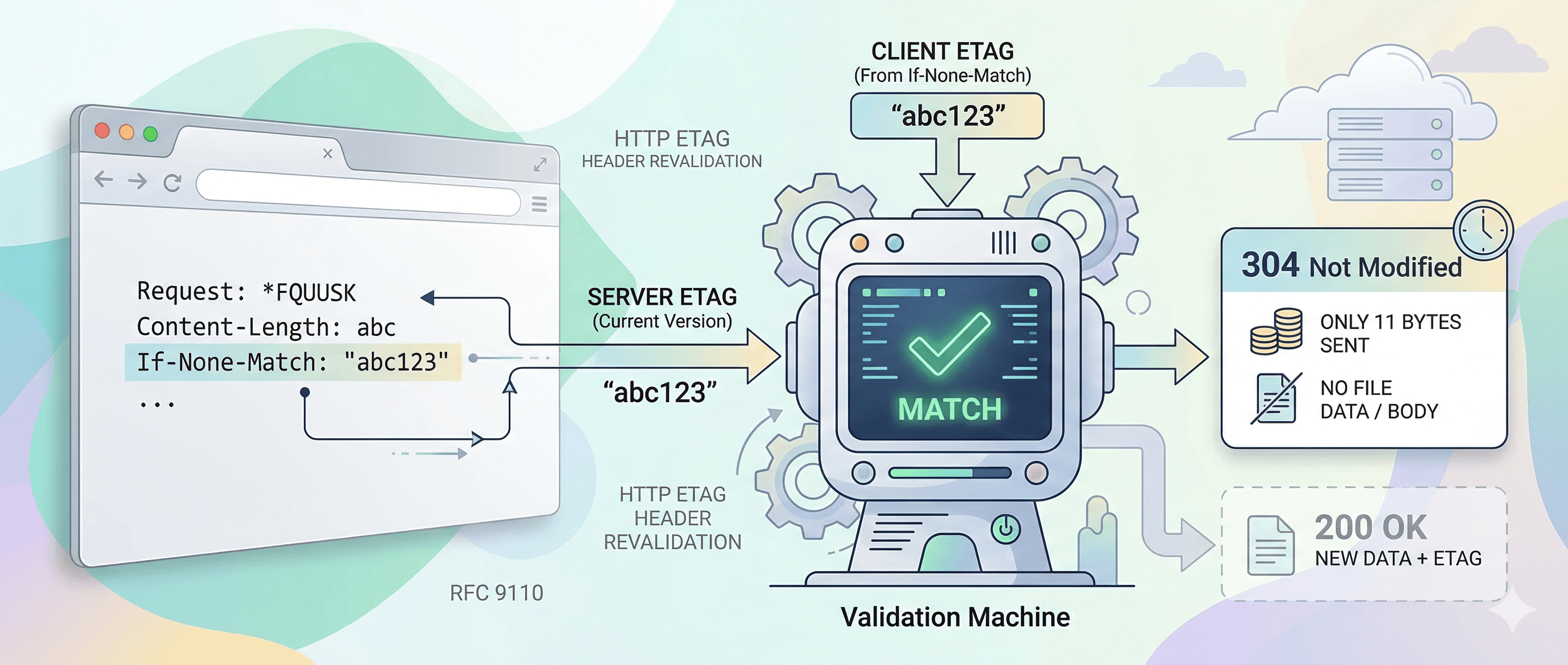
A complete developer guide to HTTP entity tags, cache revalidation, and real-world implementation across Apache, Nginx and Node.js.
Every time a browser requests a resource from a server, one of two things happens. Either the server ships the entire response body across the wire again, or it sends back eleven bytes that say "nothing changed." The difference between those two outcomes is often determined by one HTTP response header: ETag.
Most developers have seen ETags in browser DevTools, noticed the cryptic string of characters next to the header name, and moved on. But there is real performance money sitting in a correct ETag implementation, and a surprising number of production systems are leaving it on the table, either because ETags are misconfigured, misunderstood, or not used at all.
This guide covers what ETags actually are, walks through the full request-response cycle with real examples, explains the differences between strong and weak validators, shows you how to implement ETags in Apache, Nginx, and Node.js, and covers the common mistakes that break everything silently. By the end, you will know exactly when to use ETags, when to skip them, and what to watch out for.
What Is an ETag?
ETag stands for entity tag. It is an HTTP response header that carries a unique identifier representing one specific version of a resource. When a resource changes, its ETag changes too. When the resource stays the same, the ETag stays the same.
The formal definition lives in RFC 9110, the current HTTP semantics specification. The spec defines the ETag response header field as a way to differentiate between multiple representations of the same resource. In practice, it works like a fingerprint for a file or API response.
A typical ETag response header looks like this:
That quoted string is the entity tag. The server generates it, the browser stores it, and the next time the browser needs that resource, it sends the tag back to ask whether anything has changed.
One important thing to understand upfront: the actual value of the entity tag is completely up to the server. The HTTP spec does not define how it should be generated or what format it should take. From a CDN or proxy perspective, the ETag is an opaque value. It gets stored and forwarded, but nobody in the middle tries to interpret it. Only the origin server decides whether the tag it sees in an incoming request matches what it would generate today.
How ETags Work: The Full Request-Response Cycle
The value of an ETag only makes sense in the context of cache revalidation. Here is the complete flow from first request to revalidated response.
Step 1: The Initial Request
The browser makes a plain GET request. Nothing special about it.
Step 2: The Server Responds With an ETag
The server returns the resource along with an ETag header and, usually, a Cache-Control directive that tells the browser what to do with it.
The browser caches the response body alongside the ETag value. It knows it needs to revalidate before using it again because of the Cache-Control directive.
Step 3: The Conditional Request
Next time the browser needs that stylesheet, it sends a conditional GET. Instead of just asking for the file, it asks: "give me this file, but only if it has changed since I last saw it." The ETag from the previous response goes into the If-None-Match request header.
The name If-None-Match takes a moment to parse. Think of it as: send me the body only if the current ETag does not match this one. If the tags match, the resource has not changed, and there is no point sending the body again.
Step 4a: Resource Unchanged, 304 Response
If the server generates the same ETag as the one in If-None-Match, it returns a 304 Not Modified response with no body at all.
The browser uses the cached response body it already has. No data transfer happened beyond the request headers themselves. For a 48 KB stylesheet, that is 48 KB saved on every revalidating request.
Step 4b: Resource Changed, 200 Response
If the resource has changed, the server generates a new ETag, returns 200 OK, and sends the full body.
The browser updates its cache with the new body and the new ETag. The cycle repeats.
Strong vs. Weak ETags
Not all ETags are created equal. The HTTP spec defines two types: strong validators and weak validators.
Strong ETags
A strong ETag means byte-for-byte identical. If two responses have the same strong ETag, their bodies are guaranteed to be exactly the same. This is the default type, with no prefix.
Weak ETags
A weak ETag means semantically equivalent. The W/ prefix marks it as weak. Two responses with the same weak ETag are considered the same for the purposes of caching, but they may not be byte-for-byte identical.
The most common real-world case for weak ETags is compression. If your server compresses the same CSS file with gzip for one request and brotli for another, the bytes are different even though the content is identical. A strong ETag would treat these as different resources, which is wrong. A weak ETag correctly signals that they are the same content in different encodings.
Some servers handle this by appending a compression suffix to the ETag instead:
The HTTP Archive crawled over a billion resources and found this pattern in the wild fairly often. It works, but weak ETags are the cleaner solution for compressible content types like CSS, JavaScript, and SVG.
The rule of thumb: use strong ETags for binary assets like images and fonts where byte-level identity matters. Use weak ETags for text resources that get served in multiple encodings.
ETag vs. Last-Modified: Which One to Use
ETags are not the only way to handle cache revalidation. The Last-Modified header has been around since HTTP/1.0 and works on a similar principle, except it uses timestamps instead of hashes.
With Last-Modified, the browser stores the date from the response and sends it back as If-Modified-Since on the next request. The server compares it to the resource's modification time and returns 304 if nothing has changed since that date.
Here is how they compare:
In practice, use Last-Modified when you are serving static files and one-second precision is fine. Use ETags when you have dynamic content, API responses, or when resources might change and revert within the same second (rare, but it happens in high-frequency deployments).
You can also use both at the same time. When both headers are present, ETags take precedence. This is useful during a migration from one system to the other, or when serving both old and new clients.
How ETags Are Generated
The server is entirely responsible for generating the ETag value. The spec gives no guidance on format beyond saying it must be a quoted string, optionally prefixed with W/. In practice, there are a few common approaches.
Content Hashing
The most common approach is hashing the response body. MD5 is used most frequently, not because it is cryptographically secure (it is not), but because collision resistance for this use case is not a security concern. You just need two different files to produce different hashes, and MD5 is fast.
An MD5 hash produces 32 hex characters. SHA-1 produces 40. Both show up regularly in HTTP Archive data. SHA-256 (64 chars) is rare in ETag usage but technically valid.
File Metadata
Apache's default ETag combines the file's inode number, last-modified timestamp, and file size. This is fast to compute because the filesystem already tracks this information, and it does not require reading the file contents.
The downside is significant: inode numbers differ between servers. If you run Apache behind a load balancer, two servers serving the same file will generate different ETags for it. Every request hits a different server, revalidation always fails, and you get full response bodies every time. The ETag system becomes actively harmful.
For this reason, Apache's inode-based ETag generation should be disabled on any multi-server setup. More on this in the pitfalls section.
Version Identifiers
For versioned APIs or assets, the version string itself makes a clean ETag. If your API at /api/products returns data from version 7 of your product catalogue, then ETag: "v7" is a perfectly valid entity tag.
Version-based ETags are predictable, easy to generate, and easy to reason about. The tradeoff is that they require your system to actually track versions, which adds complexity elsewhere.
How to Implement ETags
Most web servers handle ETag generation automatically. The question is usually whether you need to override the defaults, not whether to write ETag logic from scratch.
Apache
Apache generates ETags by default, but its default method includes the inode number, which causes problems in clustered environments. The fix is to exclude the inode from the calculation:
For Apache 2.4 and later, you can also set this per-directory or per-virtual-host, which is useful when different parts of the site have different requirements.
Nginx
Nginx generates ETags automatically from the last-modified timestamp and content length. ETags have been enabled by default since version 1.3.3. You typically do not need to configure anything.
Nginx's ETag is weaker than a content hash because it uses mtime and size rather than hashing the body. But it avoids the inode problem that Apache has, and it works correctly in most load-balanced setups because file metadata should be consistent across servers when you deploy the same build.
Node.js and Express
Express has built-in ETag support using the etag package. It generates ETags based on the response body by default, which means they are content-based and safe across multiple servers.
For API endpoints where you control the response data, you can also set the ETag header manually based on the data version or a hash of the serialized response:
Checking ETags With curl
During development, curl is the fastest way to inspect ETag behavior without opening a browser:
A 304 response with no body confirms the ETag revalidation is working. A 200 means either the resource changed or something is misconfigured.
Common ETag Pitfalls and How to Fix Them
ETag implementations fail in predictable ways. These are the mistakes that come up most often in production environments.
Pitfall 1: Apache's Inode-Based ETag in Load-Balanced Setups
This is the most widespread ETag problem. Apache's default ETag includes the file's inode number. Inodes are filesystem-level identifiers that differ between servers even for identical files. Behind a load balancer, requests land on different servers, each of which generates a different ETag for the same resource. Revalidation never succeeds. The browser always gets a full 200 response.
The fix is simple. In your Apache configuration, remove INode from the FileETag directive:
Or, if you want content-based ETags in Apache (more reliable but slower on large files), use mod_headers with a custom ETag generated by your application layer.
Pitfall 2: ETags and CORS
If you have a JavaScript application making cross-origin requests, reading the ETag header requires explicit permission from the server. By default, CORS exposes only a small set of response headers to JavaScript. ETag is not one of them.
You need to add ETag to the Access-Control-Expose-Headers response header:
Without this, your fetch() calls can use ETags transparently for caching, but if you need to read the ETag value in JavaScript (for optimistic concurrency control, for example), the browser will not expose it.
Pitfall 3: Compression Breaking Strong ETags
If your server compresses responses dynamically and uses strong ETags based on the uncompressed content, you have a mismatch. The ETag says one thing, but the compressed bytes are different from the uncompressed bytes, which violates the contract for strong validators.
There are two correct solutions. Either switch to weak ETags for compressible content types (CSS, JS, HTML, SVG, JSON), or append a compression identifier to the ETag:
Nginx handles this automatically since version 1.7.3 when gzip is enabled. It converts the strong ETag to a weak ETag, which is the right behavior.
Pitfall 4: ETags Leaking Server Information
Older versions of Apache included inode numbers in ETags, which could reveal internal filesystem structure. This was documented as a minor security issue in Apache configurations. Disabling inode-based ETags (as described above) solves this too.
More broadly, if ETags are content hashes, they reveal nothing about your server. If they are based on file metadata or internal identifiers, think about whether that information should be visible in response headers. For API endpoints returning sensitive data, you may prefer to generate ETags from a version field in your database rather than from the response body.
Pitfall 5: ETags Without Cache-Control
ETags handle revalidation, not caching. Without a Cache-Control header, the browser does not know whether to cache the response at all, or how long to keep it. Some browsers will apply heuristic caching based on Last-Modified dates, but that is not reliable.
An ETag without Cache-Control will still work: the browser may cache the response and send an If-None-Match on the next request. But you are relying on browser heuristics instead of explicit instructions. Always pair ETags with Cache-Control:
For immutable assets where the URL changes with each new version (like hashed filenames in build tooling), skip ETags entirely. There is nothing to revalidate because the URL itself changes.
ETags and CDNs
CDNs treat ETags as opaque values, the same way HTTP proxies do. They store the ETag from the origin response, forward it to the browser, and pass the browser's If-None-Match header back upstream when needed.
Where CDN behavior varies is in how they handle revalidation at the edge. Some CDNs, like Fastly, can revalidate against their own cache and serve a 304 without hitting origin, if they can confirm the cached response is still fresh. Others always forward conditional requests to origin.
A few things to watch for in CDN setups:
-
Some CDNs strip or modify ETags when compressing responses. Check your CDN documentation to confirm how it handles ETags when it adds compression.
-
Surrogate keys and cache tags are a separate CDN concept from ETags. They are server-side cache invalidation mechanisms, not client-side revalidation. Do not confuse them.
-
If you have multiple origins behind a CDN, make sure your ETag generation is consistent across all of them. Content-based hashing (MD5 or SHA-1 of the response body) is the safest approach because it produces the same ETag regardless of which server generated the response.
-
When a CDN serves from cache and returns a 304 to the browser, the response time drops significantly because it comes from the edge rather than your origin. This is the best outcome from a latency perspective.
ETag Security Considerations
ETags are not a security mechanism, but a few security-adjacent issues are worth knowing.
Information Disclosure
As mentioned earlier, inode-based ETags (Apache's old default) expose filesystem metadata. This is low-severity, but it is unnecessary. Content-hash ETags expose nothing about your server.
Browser Fingerprinting
ETags can technically be used as a tracking mechanism, sometimes called an evercookie. A server can set a unique ETag per user. When the browser sends If-None-Match, the server reads the identifier. Clearing cookies does not clear the browser's cached ETags, so the tracking persists.
This is a real privacy concern in some contexts. If you are building privacy-sensitive applications, consider the ETag values you set on user-specific responses. In practice, most tracking via ETags is accidental rather than intentional.
Browsers in private/incognito mode handle this differently, often using a separate cache that gets cleared when the window closes.
Concurrency Control
One useful and underused application of ETags is optimistic concurrency control in REST APIs. When a client fetches a resource and gets an ETag, it can include that ETag in a subsequent write request using the If-Match header. The server only applies the write if the resource has not changed since the client last read it.
This pattern prevents two clients from overwriting each other's changes, which is a classic lost update problem in concurrent systems. It is one of the more elegant uses of ETags beyond basic browser caching.
Conclusion
ETags are a simple idea: give each version of a resource a unique identifier, let the browser store that identifier, and use it to avoid sending the same bytes twice. The browser asks "is this still current?" and the server answers with either the content or nothing at all.
The actual implementation is where things get complicated. Apache's inode-based defaults break in load-balanced setups. Compression invalidates strong ETags if you are not careful. CORS blocks JavaScript from reading ETag values unless you explicitly expose the header. And ETags do nothing on their own without a Cache-Control policy to tell the browser when to revalidate.
Get those pieces right, and ETags do their job quietly and efficiently. Most users will never know they are there, which is exactly how it should be.
If you are starting from scratch, here is the short version of what to do:
-
For static files on Apache, set FileETag MTime Size to avoid inode-related issues.
-
For static files on Nginx, leave ETags on. They work correctly by default.
-
For dynamic content and APIs in Node.js, generate ETags from a hash of the response body or a version field.
-
Always pair ETags with a Cache-Control directive. They are complementary, not interchangeable.
-
Use weak ETags for compressible content types served with dynamic encoding.
-
Skip ETags entirely for immutable assets with version-hashed URLs.
Further reading: RFC 9110 Section 8.8.3 (ETag), HTTP Archive Web Almanac (Caching chapter), MDN HTTP Caching documentation.
Explore Related Services
Enterprise Technical SEO
Drive sustainable, high intent organic traffic and dominate search rankings with our advanced search engine optimization frameworks.
Accelerate organic growthData Driven Paid Advertising
Lower your customer acquisition costs and maximize return on ad spend with highly targeted Google and Meta PPC campaigns.
Scale your ROAS